
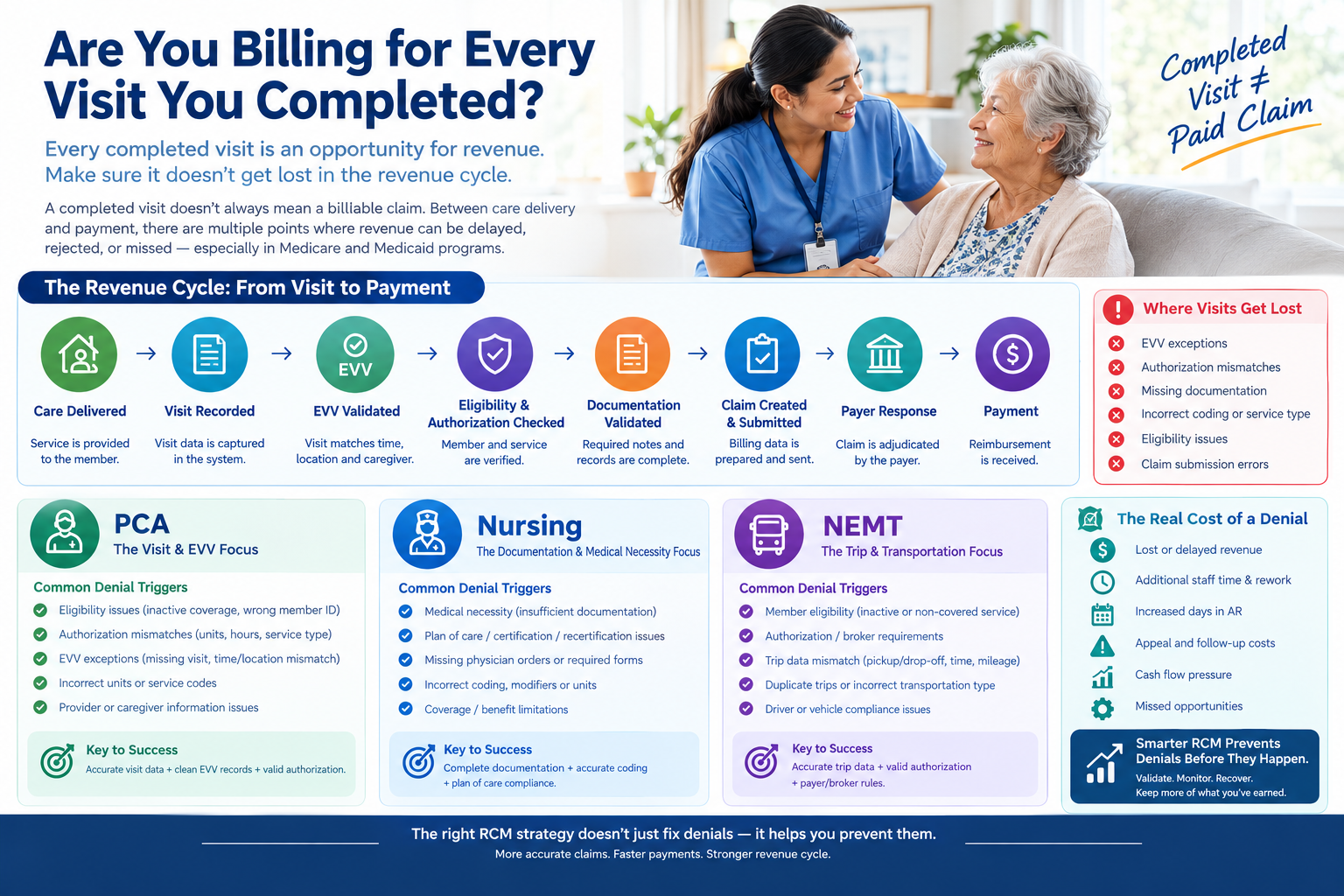
A caregiver completes a visit. The patient receives the planned service. The caregiver records the visit. The agency’s system shows that the service was delivered.
So, the obvious question is:
Did that visit actually make it into the billing process?
For many home care and post-acute providers, the answer is not always yes.
A completed visit does not automatically become a clean, billable claim. Between care delivery and payment, there are several steps where revenue can be delayed, rejected, held, or completely missed.
This is especially important for providers serving Medicare and Medicaid members, where eligibility, authorization, documentation, service codes, EVV data, payer rules, and claim requirements all need to align.
CMS requires Medicaid EVV for applicable personal care services and home health services delivered through an in-home visit. EVV data includes information such as the service provided, member, caregiver, date, start and end time, and location. (Medicaid)
That means the real revenue question is not simply:
“How many visits did we complete?”
It is:
How many completed, billable services successfully moved from visit data to a clean claim?
The Gap Between a Completed Visit and a Paid Claim
Consider a simple example.
A personal care provider schedules 1,000 visits during a month.
The caregivers complete 960 visits.
The system records 950.
Of those 950 records:
- 20 have EVV exceptions
- 15 have authorization issues
- 10 have missing or incomplete documentation
- 5 have incorrect service or billing information
That leaves 900 visits ready for billing.
The provider may think it completed 960 visits.
But from a revenue perspective, only 900 may be ready to move through the billing process.
That difference represents 60 completed visits that require investigation.
Some may eventually be corrected and billed.
Others may become delayed revenue.
Some may never be recovered.
This is where revenue leakage begins.
Completed Visit Does Not Always Mean Billable Visit
One of the most important concepts for home care billing teams is that service delivery and claim readiness are not the same thing.
A visit can be completed but still fail one or more billing requirements.
For example:
| Visit Status | What Happened | Billing Risk |
| Completed | Care was delivered | Low by itself |
| Completed + EVV exception | Visit occurred but EVV data has an issue | Claim may require correction |
| Completed + authorization mismatch | Service may not match approved authorization | Claim may be denied |
| Completed + missing documentation | Required documentation is incomplete | Claim may be held or denied |
| Completed + wrong service code | Care was delivered but mapped incorrectly | Billing error |
| Completed + eligibility issue | Member coverage cannot be validated | Claim risk |
| Completed + clean | All required data aligns | Ready for billing |
The goal of an effective revenue cycle is therefore not simply to count completed visits.
It is to make sure completed services become valid, billable services.
Medicare and Medicaid Work Differently
There is another important distinction.
The question “Are you billing for every visit?” does not mean that every Medicare home health visit is necessarily submitted as a separate claim line and paid independently.
Under Medicare’s Home Health Prospective Payment System, home health payment is generally based on a 30-day period of care, with payment determined using the applicable payment methodology. CMS also uses reported visits by discipline in certain payment calculations, including outlier payment calculations. (CMS)
Medicaid programs, meanwhile, can have different state-specific billing structures for personal care and home health services, including service units and EVV requirements.
So the broader question is:
Are all eligible and properly documented services being captured and correctly represented in the billing process?
That is the revenue-cycle question providers should monitor.
Where Completed Visits Get Lost
A visit rarely disappears from the billing process because someone intentionally decided not to bill it.
Revenue leakage usually happens because information breaks somewhere between service delivery and claim submission.
Here are some of the most common points of failure.
1. The Visit Was Completed but Never Captured Correctly
The caregiver completed the visit.
But the visit record may not have transferred correctly from the scheduling, EVV, EHR, or agency management system.
For example:
- Visit was completed but remained in a pending status
- Data synchronization failed
- Integration did not transfer the record
- Visit was entered manually but not approved
- Duplicate records were created
- Data was imported incorrectly
- Visit remained stuck in an exception queue
From the caregiver’s perspective, the visit happened.
From the billing system’s perspective, it may look incomplete.
The result?
Care was delivered, but revenue was never activated.
2. EVV Exceptions Can Stop the Billing Process
For Medicaid-funded personal care and applicable home health services, EVV is a major part of the service data lifecycle.
CMS states that EVV must verify key information such as:
- The individual receiving the service
- The individual providing the service
- The type of service
- Date of service
- Start and end time
- Location of service delivery (Medicaid)
A visit can therefore be completed while still generating an EVV exception.
Common examples include:
- Missing clock-in
- Missing clock-out
- Incorrect location
- Time outside the authorized schedule
- Wrong caregiver
- Wrong service type
- Overlapping visits
- Incorrect member association
If these exceptions are not resolved quickly, the service may not move cleanly into billing.
The important point:
EVV should not be treated only as a compliance system. It is also part of the revenue pipeline.
3. Authorization Does Not Match the Visit
Imagine a member has authorization for:
Personal Care – 20 hours per week
But the actual service data shows:
24 hours delivered
Those additional hours may not automatically become payable.
Or perhaps the authorization is valid for one service code while the visit was recorded under another.
This creates an authorization-to-service mismatch.
Before billing, providers should be able to answer:
- Is the authorization active?
- Is the member covered for the date of service?
- Is the service authorized?
- Is the caregiver/service type appropriate?
- Are the units within the authorized amount?
- Is the authorization exhausted?
- Does the service code match the authorization?
Without this validation, providers may submit claims that were never likely to be paid.
4. The Visit Exists, But Documentation Is Incomplete
A completed visit still needs supporting documentation where required.
For Medicare home health, CMS emphasizes documentation supporting eligibility, medical necessity, the plan of care, and related requirements. CMS specifically notes that supporting medical records must justify the patient’s need for skilled services and homebound status. (CMS)
A visit can therefore exist in the system while the documentation needed to support billing is incomplete.
Examples include:
- Missing visit note
- Incomplete note
- Missing signature
- Incorrect date
- Missing required assessment information
- Documentation inconsistent with the service
- Documentation not linked to the correct member or episode
This creates a dangerous situation:
The provider knows the care happened, but the claim cannot adequately demonstrate it.
5. The Wrong Service or Billing Code
Another common source of leakage is incorrect mapping.
The service was delivered correctly.
The visit was documented.
But the billing system maps the service to the wrong:
- Service code
- Revenue code
- Modifier
- Unit type
- Payer-specific billing configuration
- Provider or caregiver identifier
The result can be a rejected or denied claim even though the underlying care was legitimate.
This is why billing validation should happen before claim generation, not after the payer returns a denial.
CMS maintains specific coding and billing guidance for home health claims, including applicable billing codes and claim requirements. (CMS)
6. The Visit Is Ready, But Nobody Notices It
This is one of the most overlooked problems.
A billing team may have thousands of visit records.
Most are clean.
A small percentage require attention.
The problem is that those exceptions can become buried inside reports.
For example:
5,000 completed visits
↓
4,850 billing-ready
↓
150 exceptions
↓
Some are corrected
↓
Some remain pending
↓
Some become late
↓
Some become missed revenue
If the billing team only monitors total completed visits, they may never see the 150 exceptions clearly.
This is why providers need exception-based revenue management rather than simply more reports.
What Should You Compare Every Day?
A strong billing operation should compare multiple stages of the service lifecycle.
At minimum:
Scheduled Visits
How many services were planned?
↓
Completed Visits
How many services were actually delivered?
↓
Captured Visits
How many were successfully recorded?
↓
Validated Visits
How many passed EVV, authorization, eligibility, documentation, and service checks?
↓
Billing-Ready Visits
How many are ready to become claims or claimable service data?
↓
Submitted Claims
How many moved into the payer submission process?
↓
Accepted Claims
How many passed initial payer processing?
↓
Paid Claims
How many ultimately generated payment?
This creates a much more useful measurement:
Scheduled → Completed → Captured → Validated → Billed → Accepted → Paid
Instead of asking only:
“How many visits did we complete?”
the billing team can ask:
“Where did the completed visits stop?”
A Simple Visit-to-Revenue Example
Let’s take a hypothetical Medicaid personal care provider.
Suppose the provider completes:
10,000 visits per month
Average billable value:
$75 per visit
The theoretical service value is:
10,000 × $75 = $750,000
Now assume:
- 150 visits have EVV exceptions
- 100 have authorization issues
- 75 have documentation problems
- 50 have coding/service mismatches
- 25 fail other billing validations
That’s:
400 visits requiring attention.
At $75 per visit:
400 × $75 = $30,000
That does not automatically mean $30,000 is permanently lost.
Some of those visits may be corrected and billed.
But it represents $30,000 of service value that requires intervention before it can reliably become revenue.
That is the number billing leaders should want to see.
Why Denial Reports Are Not Enough
Many providers focus heavily on denial reports.
Denial reports are important.
But they show problems after the claim has already reached the payer.
By then:
- Staff time has already been spent
- The claim has already been submitted
- Payment has already been delayed
- The AR cycle may already be affected
- Additional follow-up may be required
A better approach is to identify problems before claim submission.
For example:
Traditional approach
Visit → Claim → Denial → Investigation → Correction → Resubmission → Payment
Preventive approach
Visit → Validation → Exception → Correction → Clean Claim → Payment
The second approach moves problem resolution closer to the source.
That can reduce unnecessary rework and help billing teams focus on exceptions before they become payer-facing problems.
The Real KPI: Visit-to-Claim Conversion
One useful metric is:
Visit-to-Claim Conversion Rate
Billing-ready services ÷ Completed billable services × 100
For example:
- Completed billable services: 10,000
- Billing-ready services: 9,600
Visit-to-claim conversion:
96%
The remaining 4% should not simply disappear into a report.
The system should explain why.
For example:
| Exception | Visits | Potential Action |
| EVV mismatch | 150 | Correct EVV |
| Authorization issue | 100 | Verify authorization |
| Missing documentation | 75 | Complete documentation |
| Service-code mismatch | 50 | Correct mapping |
| Eligibility issue | 25 | Verify coverage |
| Total | 400 | Resolve before billing |
This changes the conversation from:
“Why did we have a 4% gap?”
to:
“What caused the gap, who owns it, and how much revenue is associated with it?”
That is a much more actionable approach.
Revenue Leakage Can Happen Before a Claim Exists
One of the biggest misconceptions in revenue cycle management is that revenue leakage starts with a denied claim.
It doesn’t always.
Revenue leakage can begin much earlier.
Consider this lifecycle:
Care Delivered
↓
Visit Recorded
↓
EVV Validated
↓
Eligibility Checked
↓
Authorization Verified
↓
Documentation Validated
↓
Service/Billing Rules Checked
↓
Claim Created
↓
837 Submitted
↓
Payer Response
↓
835 / Payment
↓
Denial & AR Follow-Up
A problem at any earlier stage can affect the final payment.
That is why modern RCM should not begin with the claim.
It should begin with the service data that creates the claim.
How Revenue Catalyst AI Can Help
This is where an integrated RCM platform can make a significant difference.
Revenue Catalyst AI is designed to connect the operational service data with the downstream billing and revenue cycle.
Instead of treating visits, claims, denials, and payments as separate activities, the workflow can connect them:
Visit Data
→ Data Validation
→ Eligibility & Authorization
→ State/Payer Rule Validation
→ Claim Validation
→ 837 Claim Generation
→ Claim Submission
→ 835 / Payer Response
→ Denial Management
→ AR Follow-Up
→ Revenue Recovery
The objective is simple:
Don’t wait for the payer to tell you something is wrong.
Identify the problem before the claim leaves the provider’s system whenever possible.
From “Completed Visits” to “Revenue-Ready Visits”
One of the most useful changes for a billing team is to stop looking at completed visits as the final operational metric.
Instead, create visibility into:
Completed
The service was delivered.
Exception
Something requires attention.
Validated
The service passed the required checks.
Billing Ready
The service is ready for claim processing.
Submitted
The claim has been sent.
Accepted
The payer accepted the claim for processing.
Paid
Payment has been received.
This gives leadership a much clearer picture of the revenue cycle.
One Dashboard Can Show the Entire Picture
A billing manager shouldn’t have to open five different systems to answer:
“We completed 10,000 visits this month. How many became revenue?”
A connected RCM dashboard should make that visible.
For example:
Visit & Service Overview
- Completed visits
- Exceptions
- Validated visits
- Billing-ready services
- Services pending action
Eligibility & Authorization
- Eligibility failures
- Authorization mismatches
- Expired authorizations
- Units approaching limits
EVV
- Missing clock-in/out
- Location exceptions
- Time mismatches
- Unverified visits
Claims
- Claims ready
- Claims submitted
- Accepted claims
- Rejected claims
- Claims pending
Denials
- Denial volume
- Denial reasons
- Denied dollars
- Preventable denials
- Appeal status
AR & Payments
- Outstanding AR
- Aging buckets
- Payments received
- Follow-up required
- Revenue at risk
This gives the billing team a single connected view:
Care → Visit → Validation → Claim → Payer → Payment
The Goal Isn’t to Bill More. It’s to Bill Correctly.
There is an important distinction.
The goal is not to submit every completed visit blindly.
A provider should not bill a service simply because a caregiver says it occurred.
The service needs to meet the applicable requirements for the payer, program, authorization, documentation, coding, EVV, and claim.
The real objective is:
Capture every eligible service, validate it against the applicable rules, and move clean services into billing without unnecessary delay. That is the difference between more billing activity and better revenue-cycle performance.
